

Best game controllers for Linux currently in use and continue to grow in popularity. Thanks to a collection of player feedback and support across the platform. All of these are usable in affordable ranges.
Let’s talk about something close to every player’s heart: controllers. Whether you’re diving into epic adventures, racing through intense tracks, or battling it out in competitive arenas, having the right hardware can make all the difference. So here’s a quick rundown of some of the best game controllers out there, perfect for any setup. And while we might earn a little from these Amazon links, this article is really all about supporting the Linux gaming community.
Xbox Series X|S Game Controller: One of the Best for Linux

- The Series X|S stands out for its excellent build quality and comfy design, while making it the best compatible game controller. It works right out of the box with many distro’s.
- Feel the modern design of the branded Wireless Controller in Carbon Black. With sculpted surfaces and refined geometry, it ensures better comfort and easy control during while playing.
- Stay on target with textured grips on the triggers, bumpers, and back case. The new hybrid D-pad also offers precise and familiar input.
- Customize your controller with the brand Accessories to make it truly yours.
- Plug in any compatible headset with the 3.5mm audio jack. The controller features Xbox Wireless and Bluetooth (wired is ideal) for solid gameplay.
- Use the USB-C port for direct plug and play to your PC. While supporting AA batteries for extended playtime.
Here is an in-depth guide to ensure Xbox Series X|S work on your distro. Yes you will need access to a Windows install.
Level up your setup with this essential gear—check it out now on Amazon.
PlayStation DualSense (PS5)
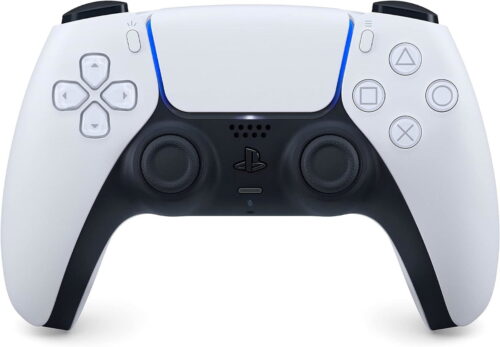
The PS5 controller is another one of the best game controllers for Linux thanks to its features and comfy design. Even though some parts like adaptive triggers aren’t fully supported yet, it still works great for most titles.
- Bring It to Life
Feel your in-game actions with haptic feedback. Experience different levels of force and tension with the adaptive triggers. These features are due to make your gaming world more immersive. - Chat and Share Easily
Use the built-in microphone to chat online or plug in a headset with the 3.5mm jack. Record and share your epic moments with the create button. - Iconic Design
Enjoy the comfortable design and familiar layout, along with enhanced sticks. Supported titles also offer higher quality sound effects through the built-in speaker. - Connect to Multiple Devices
Use a USB Type-C cable or Bluetooth to connect to various devices. - Boost Your PC Gaming
Elevate your PC gameplay with advanced features like haptic feedback in many titles.
The PlayStation DualSense controller brings next-level gaming to your fingertips. You can also use Chiaki to enable remote play for PS4/PS5. Here’s a the guide for more detail.
Enhance your gameplay experience — grab this must-have accessory today on Amazon.
Xbox One: One of the best game controllers for compatibility

Likewise, if you’re looking for a reliable and comfy, the Xbox One controller is one of the best choices. Just like the Xbox Series X|S controller, it’s well supported.
- Linux Compatibility:
The Xbox One controller works seamlessly with the OS, making it easy to jump into your favorite titles without any hassle. - Enhanced Comfort:
You’ll love the improved comfort and feel of the Xbox One controller. It’s designed for long gaming sessions, so your hands won’t feel tired. - USB Cable Included:
For the most stable connection, especially on Windows 10 devices, the Xbox One controller comes with a USB cable. This ensures you get the best performance every time you play.
Find this perfect match for your rig on Amazon.
You may need to install the xboxdrv package: apt install xboxdrv on Ubuntu/Debian. For Arch, it’s in the AUR already.
8BitDo Controllers: Some of the Best and Easiest Game Controllers to Use

8BitDo game controllers are a must-have for any Linux gameplay. Since they are known for their high customization options and compatibility with multiple platforms. One standout model is the 8BitDo Pro 2, which has also gained popularity for its versatility and retro-inspired design.
Key features include:
- Wired Controller: Comes with a handy 1.8M USB cable.
- Compatibility: Works seamlessly with Linux and Raspberry Pi devices.
- Rumble Vibration: Also adds a tactile feel to your experience.
- Turbo Function: Perfect for those intense sessions.
Whether you’re a casual player or a hardcore player, 8BitDo controllers provide a fantastic blend of modern functions and retro charm.
Enhance your gameplay experience — grab this must-have today on Amazon.
Logitech F310 and F710 – are also some of the best economic game controllers

Logitech F310 and F710 controllers are a hit among players for their sturdy build and dependable performance. The F310 is wired, while the F710 gives you the freedom of wireless play. Both work great on Linux, too.
- Plugging them in is a breeze with a simple USB connection. They’re compatible with Windows XP, Vista, and 7.
- You can customize them with Logitech’s Profiler software, while giving you the ability to set up the controls just how you like. This software needs to be installed first.
- These controllers are best for supporting a wide range of titles. Right from the latest hits to classic favorites. With 10 programmable buttons and also an 8-way programmable D-pad, you have full control at your fingertips.
- The F310 is perfect for playing Android TV titles, apps, and entertainment seamlessly.
- Just a heads-up: Logitech uses different serial numbers for packaging and products. So, keep your receipt for warranty purposes.
Get ready for an enhanced gameplayer experience with Logitech F310 and F710!
Take control of your sessions with top-rated tools. The F310 is on Amazon. While F710, keeps you playing hands free Amazon.
Nintendo Switch Pro alternative: A Comfortable Choice

The Nintendo Switch Pro Controller is loved for its comfortable grip and solid build quality. It’s also a great option for gamers, though you might need some extra software to set it up just right.
Easy Ways to Game
The Pro Controller is due to give you option for a great gaming experience no matter how you play. But for a more compatible gamepad, explore this equipment for your arsenal on Amazon.
If your Joystick, Gamepad, or Controller Does Not Work:
So, if you’re having a problem with a generic game controller or a traditional gamepad or joystick, there is hope. A tool called joystick includes drivers and finds input. Since you can use it to reconfigure controller mappings.
Install in the Ubuntu/Debian terminal with:
sudo apt install joystick
This provides the drivers you need. To configure mappings and so forth, use jstest-gtk:
sudo apt install jstest-gtk
For Arch users, check out this wiki page.
If you have any other suggestions or gamepad’s, leave a comment below and I’ll add them to the list.